 Following on from his review of the Viewsonic VP191s, Mike covers a software utility that works your two screen setup hard.
It wasn’t long ago that fancy twin monitor sets ups were the sole preserve of hotshot traders, high-flying graphics pros and, err, security guards, but recent price crashes have seen flat-screen multi-screen set ups becoming more affordable.
Although XP comes with basic twin monitor support as standard, keeping track of all your open applications over two (or more) screens can soon become a pain.
Under XP, arranging windows on each of the different displays involves dragging and dropping them all over the place, and with the taskbar only appearing on the primary monitor, things can soon get confusing.
Ultramon is a smarty-pants application that helps sort out your desktop chaos, making it a breeze to work with multiple displays.
 With support for more than ten monitors, UltraMon adds a raft of user-configurable tools to help users get a manly grip on their acres of screen real estate.
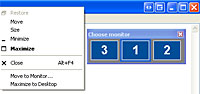
The program adds a taskbar to each monitor, and only shows applications from the monitor it is on – so you won’t have to rummage around a single taskbar any more.
If you drag an application to a different monitor, its taskbar button will be moved to the corresponding taskbar. Neat.
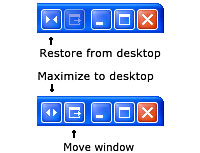
Moving programs around the screen is also made easier with the addition of two new buttons to the title bar.
 These little fellas let you quickly shunt programs across to other screens with a single click, or maximise a single window across the entire desktop.
Shortcuts can be configured for moving and maximizing windows, with UltraMon’s full range of options available by right clicking on the icon in the taskbar.
Amongst its multifarious options, you can create shortcuts that open programs on a specific monitor or at a specific position, or even configure the program to change the display settings before launching an application and then restoring them when the program is closed.
These settings can also be configured by opening the properties of an existing Windows shortcut and fiddling about in the new tabs added by UltraMon.
Keyboard shortcuts can be set up for moving and maximising screens, with ‘display profiles’ letting you quickly change the settings of one or more monitors for each user.
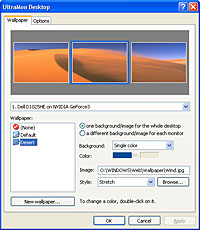
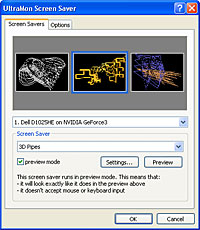 The program also lets you stretch desktop wallpapers and screen savers across multiple screens or set a different picture and screen saver for each screen, which can look way cool!
After running UltraMon for just a few minutes we realised that we could never go back to the clunky, fiddly ways of Windows, so for anyone look to get the best out of their multi-screen set-up, we can thoroughly recommend the program.
Score: 5/5

UltraMon
Cost: $39.95 (~£22~€33)
 Neat Idea!
 They’ve done it again
 It’s like the Middle Ages all over again!
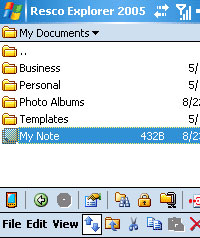 With Pocket PCs offering more and more storage space and applications shunting files all over the place, it’s getting increasingly difficult to manage the data held on a handheld device.
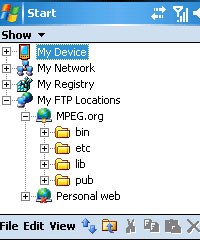 Serving up an arm-long list of features, Resco manages to combine the functions of a host of different applications and meld them into one sophisticated, do-it-all, integrated solution.
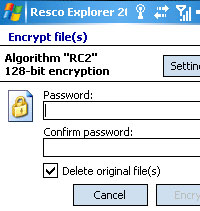 Files can be encrypted from within the program (and from a desktop applet) enabling data to be organised and secured within the same interface. Neat.
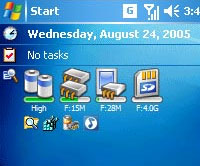 Add to that the improved support for compression – letting users save files at different levels of compression – and a new Today plug-in providing on battery status and free storage/memory and you’ve got a Five Star application that is an absolute must for all Pocket PC users.
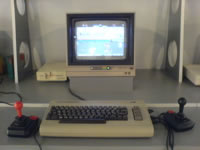
 Mention the name “Commodore” to old skool gamers of a certain age, and you might see a tear welling up in their eyes as they recall long, blissful hours playing Frontier Elite, Sensible Soccer and Lemmings on the legendary gaming platform.
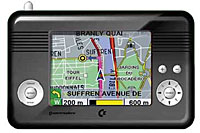
 Codenamed ‘The Navigator Combo’, the Windows CE-based handheld comes with a 30GB hard drive (preloaded with maps), a big 3.6in touch-screen display and an integrated GPS receiver, all packed into a refreshingly chunky case.
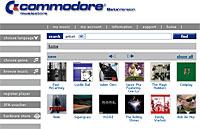 Videos can also be downloaded from the Internet or transferred from PCs via USB 2.0, or stored on SD memory cards.
 The two companies presented a wide range of shiny new consumer electronic products for consumers and the retail market, including MP3/MP4-players, C64 gaming joysticks, multimedia download dispensers and home media centers.
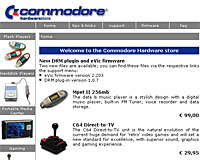 Building up to the required mutual backslap, he added, “Therefore the management of Yeahronimo and SupportPlus believe it is an obligation, when using the Commodore name, to continue offering the electronics consumer with products that have a high-quality and are attractive in price. SupportPlus already has showed they are an excellent partner in the historic re-launch of Commodore.”
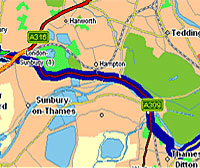
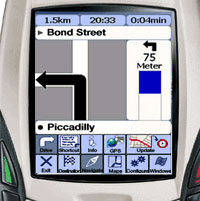 GetMeThere.co.uk has launched what they are claiming is the first, free to install, Pay-as-you-go Mobile Satellite Navigation solution in the UK.
 The system offers a comprehensive suite of features, including full turn by turn navigation, voice commands, traffic avoidance, auto-zooming maps as a junction approaches, hands free use, European road network coverage with full address, house number, street and postcode search.
 Jon West, Director of GetMeThere.co.uk said “With over 4.5m navigationsystems expected to be sold this year across Europe, TARA Mobile SatNav has arrived just in time to provide a low cost, quality solution for the intelligent motorist. With GPS devices now available at around the £50 ($90, €74) mark, SatNav has become a must have for all motorists”.
 Following their free-for-24-hour offer at the end of August, Opera Software has permanently removed the ad banner and licensing fee from its award-winning Web browser.
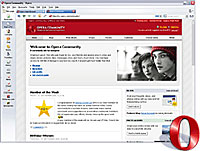 Previously, Opera was only available free if users were prepared to put up with a distracting ad banner stuck on the top of the browser interface, with the option to shell out for a $39 (£21.60, €32) licensing fee to remove the thing and receive premium support.
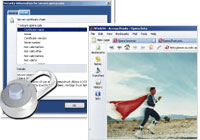 It seems a bit of a gamble to us – both IE and Firefox are also available free of charge and without a huge marketing campaign we can’t see how they’re going to get enough users to switch from their far better known rival products.
 Once again, the UK has grabbed the number one slot on Top Of The Bots, possessing the world’s highest proportion of known bot-infected computers.
 Symantec puts this down to the huge rise in broadband subscriptions coupled with the delays in software patches for operating systems and software being made available.
 A new text-messaging service called EggAlert wants to help women to keep better track of their menstrual period. The service calculates a woman’s next ovulation time and sends a tet message (SMS) to her cell phone altering/warning her she at the hight of her fertility. While the Website of EggAlert focuses on women who want to become pregnant, we’re thinking the service could also be used as a form of contraception.
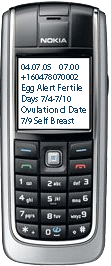 Some Questions are left open: According to the Website, the service is available worldwide, but seems only be on-hand for customers with a billing address in the US and Canada. That’s why we could not get through to the signing-up process to check if more than one cellphone number could be handled. As it would be nice to send a message to the partners cellphone too.
 We can see a long term merging of with company will be a quick dating service when it’s linked with location-based data.
 Yo! Yo! Yo! Word! The Associated Press are getting hip and launching a news service for da yoot. Wicked, innit?!
 So far, more than 100 newspapers have signed up for asap, with the option to use the content for their online editions, print editions or both.