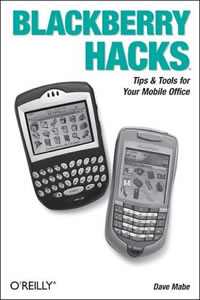
 Another in the “hacks” range of O’Reilly books, where hacking is doing interesting things with something, rather than the unfortunate media convention of breaking into computers (which has some relevence as you’re getting into the guts of the BlackBerry in ways RIM, the manufacturer, may not have expected and/or indeed intended).
It’s a mainly techie book, so a casual BlackBerry user who gets their IT department to configure everything, or a consumer who goes to their mobile outlet and buys one off-the-shelf probably should stay away, though there are some useful bits for them.
It covers: –
- Using Your BlackBerry
- Games
- The Internet and Other Networks
- Free Programs
- Shareware Apps
- BES Adminstration
- The Web and MDS
- Application Development
The chapters get more technical as they go on. General users will definitely find some help from the first two which go through basic BlackBerry functions and how to optimise things, including your Email settings and accessing multiple accounts. There’s a good introduction to using mail through a BES (BlackBerry Enterprise Server), the Desktop Redirector and BWC (BlackBerry Web Client).
Installing programs (including games) might be easy, but you’ll either need access to the Desktop Manager for some, or access them over-the-air and install through the browser. If your BlackBerry is locked down by your IT department, you may not even get that far. Assuming yours isn’t, there’s a wealth of software out there and the book highlights some of the “really useful” stuff, with links to more.
Accessing the Internet is also not as easy as you might think, and the BlackBerry can actually get network access via a variety of methods including through the BES (which is the corporate way of working, and is like a virtual private network to the inside of the firewall) and accessing the Internet directly from the device itself through the GPRS connection of your mobile network.
Administrators (who actually enjoy adminstering systems) will love this book. There’s a very good section on how to do interesting things that an administrator wouldn’t normally be expected to be able to do (like import/activate lots of BlackBerry users at once) and all sorts of scripts to make life easier.
It’s even possible to make the BES “push” applications and content to all an organisations BlackBerry users (or groups of them) over air and so in a business environment all the users can have the same versions of software running on their systems and access to the right corporate applications and data.
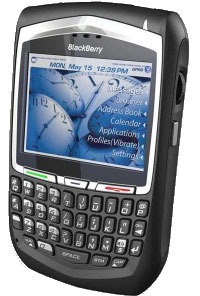 The book also gives a good insight into programming the Blackberry and describes the tools that RIM provide and how to go about using them (and what other things you need to do). RIM originally made the BlackBerry for corporates and the last thing they wanted was nasty virii and programs infecting them, so when a program tries to access some of the BlackBerry’s inner workings the BlackBerry actually checks that the program is valid and should be doing that. RIM force programmers to “sign” programs and there’s info on how to go through that process.
Summary
As a techie book for techie users and administrators it definitely meets its objectives and there’ll be things that even hardened BlackBerry users will find new and useful.
As a newbie corporate user, get your IT department to sort it out.
As a casual Blackberry user or if it’s a corporate issued Blackberry, stay away – though the first couple of chapters might seem relevent and give you some tips, most of the book will be over the top and very hard to wade through.
Score
For the intended audience: 92%. It hits the mark.
Author: Dave Mabe
ISBN: 0-596-10115-5
RRP: (GBP)17.50
Buy it
Buy it on Amazon UK – £11.55
Buy it on Amazon US – $15.72
 With the weather warming up and the great outdoors beckoning, here’s our selection of must-have gadgets for technology addicts heading off for a day strolling over heath and heather.
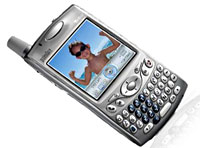 Smartphone: Treo 650
 Where the chuffin’ ‘eck am I? GPS and Memory-Map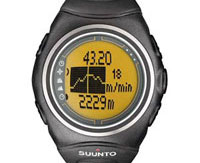
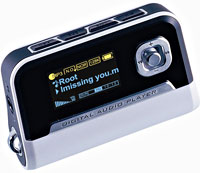 Proof that podcasting is moving further into the mainstream comes with the news that MP3 players from mobiBLU will be shipping with preinstalled software designed to download podcasts with just one click,.
 With a wagging finger and nodding head, Russell Holliman, founder and CEO at Podcast Ready sighed, “There is a huge perception that podcasts are for Apple users only, and if you’re not using an iPod it’s a difficult process.”
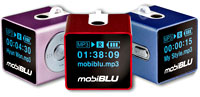 The appropriately named mobiBLU Cube is, at 0.94″ square, one of the smallest in the world and comes with a large OLED (Organic Light Emitting Diode) display.
 Now, we like gadgets. And shiny things. And we like football (well some of us).
 There’s also ample storage on board in the shape of a 80GB SATA HDD, with a set of built-in Harman & Kardon speakers for playing back the roar of thousands of tanked up Taffies as Wales slam in the winning World Cup goal (well, we can dream).
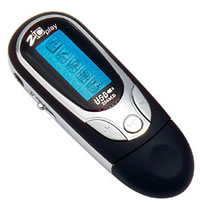 The Zicplay MiniKey is a tiny audio player. It comes in versions from 256MB to 1GB. There’s also a version with a built in FM tuner. The version we tested was the 512Mb model.
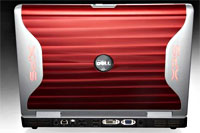 Dell has released a beast of a notebook, with its dual-core processor, groovy glowing lights and ramped-up video RAM aiming the XPS M1710 squarely at mobile gamers.
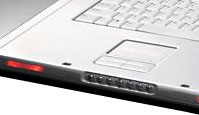 The Metallic Black M1710 weighs in at a wallet-draining $2,600 and comes with Intel’s Core Duo T2400 processor, 1GB of DDR2 memory, 256MB GeForce Go 7900 GS graphics and a 60GB hard drive.
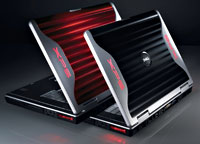 Both notebooks feature Microsoft’s Windows Media Center Edition operating system, and system upgrades can expand storage to 120 of GB hard drive space and up to 4 GB of 667MHz DDR2 memory.
 There’s also built in Wi-Fi, high definition integrated stereo with two 2 watt per channel main speakers and a 5 watt, class D subwoofer with bass reflex port.
 The XPS M1710 is estimated to ship in the second week of May. EK/EU delivery and prices to be announced.
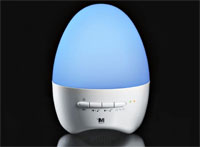 If there’s one thing we’ve always thought that’s been missing when we’ve been grooving to our MP3 files, it’s an egg-shaped device that changes colour to the music.
 If you’re rocking out at home, the lights go up to 11 for Hip Pop or dance music, while if you’re in the mood to get down with your laydee, the LEDs will glow all soft and romantic as you slip on some sweet-talking tunes from the love lothario himself, Chris ‘look out ladies’ DeBurgh.
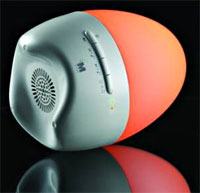 The player supports MP3 and WMA format music files and also comes with a line-in connector for non-USB audio devices, such as CD players and cassette recorders.
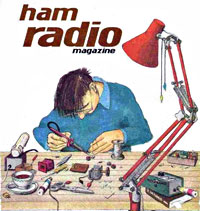 If you thought that beardy ham radio operators slurping tea in sheds full of wires and glowing valves had gone the same way as the Sinclair C5 and 8-track cartridges, think again.
 It the gentle world of Ham operators’, their sport involves a ‘fox’ of the human kind going into hiding with wireless equipment and an external antenna.
 Ham radio signals, on the other hand, could be sent to any part of the world wherever another Ham, operating on the same frequency, was located.
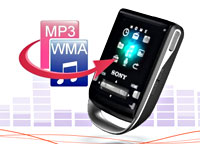 Details of a snazzy new range of Sony flash memory MP3 player/FM radios with a colour display have appeared on Sony’s Chinese site.
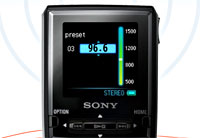 Sporting attractively bijou dimensions of 75.5mm x 45.5mm, the CE-P is smaller than a credit card (but not as thin, natch) and is designed for carrying around your neck, gangsta-stylee.
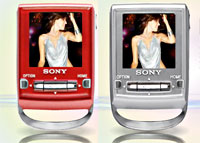 The CE-P series will come in three flavours, offering storage capacity from 256MB to a 1GB.
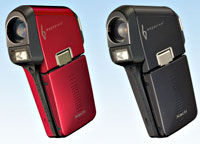 Sanyo have just launched what it’s claiming is the world’s smallest, thinnest and lightest solid state digital camcorder, the Xacti C6.
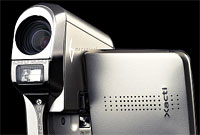 Saving space by recording straight to a SD card instead of using conventional tape, recordable DVD or hard disk, the Sanyo can grab an hour of VGA resolution (640?480 pixels) video at 30 frames-per-second on a 1 GB card using the “TV-HQ” mode (MPEG-4 bit rate: 2 Mbps).
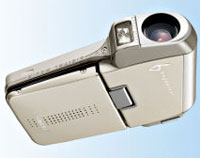 There’s also a 5x optical zoom, 12x digital zoom and a Digital Image Stabiliser for correcting any wobbles, with the CCD sensor using 9-pixel mixing technology to record brighter and clearer video in low-light situations.