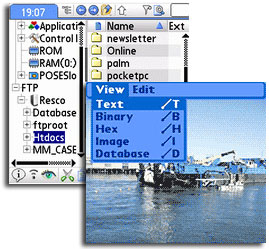
 We felt the pocket-throbbing love big time for the Pocket PC version of the file utility application Resco Explorer, so when we heard that the Palm version had enjoyed a major upgrade, we were hot to hotsync.
A veritable Swiss army knife of file management functionality, Resco Explorer is a must-have app for advanced Palm users who like to get under the hood of their handhelds and take command of their files.
Now up to version v3.01, the main meat’n’potatoes of Resco Explorer is of course the file manager, which makes it easy to search, copy, move, delete, rename, drag’n’drop and filter files to your heart’s content via the customisable user interface.
Just like Windows explorer on your PC, files can be viewed as big icons or as a detailed text list with columns which can be ordered by name, size etc with advanced filtering options available.
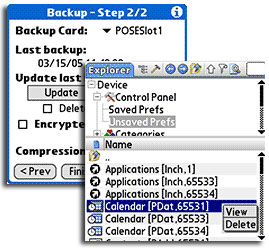 Files can be easily shuffled betwixt the handheld and the memory card, with a built in image viewer providing speedy
full-screen image previews of JPG, BMP and GIF images.
External viewers can be allocated for specific file types, so DOC and XLS (Word / Excel) files can be opened with one click by, for example, Documents To Go while clicking on MP3 files could launch PocketTunes etc.
New for version 3 is full FTP integration which lets you view, copy and delete files on remote servers as easily as if they were on your Palm or memory card.
More features
The Zipper applet uses a PC-compatible Zip algorithm for extracting archives created on a desktop PC (and vice-versa) with the zipped folders appearing as regular folders on the handheld. Zipped folders can have password-based encryption applied.
A neat RAM Analyser tool lets you have a good root about in your RAM and identify old and unneeded data files by sorting files into logical folders grouped by the application or purpose.
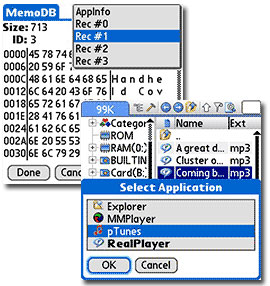 Full on spoddy types will *heart* the Hex Viewer, with a text mode offering full editing capabilities. The program can also read, write and beam good ol’ .txt files, making it easy to share info with the non-Palm world.
Wrapping up the feature set is the ability to fully back-up the Palm’s files to a memory card, with verification making sure the data’s safe.
Backups can be saved, restored and deleted as you fancy, with options to select what files you want backed up. There’s no scheduling feature though – users looking for a more advanced back up application should consider Resco’s BackUp program or the excellent freeware NVBackup.
Currently on offer for $19.95, Resco Explorer 2007 is an essential application for Palm enthusiasts, offering FTP functionality, powerful file management and file compression and backup in a stable, easy to use one package. We highly recommend the program.
Features: 88%
Ease of use: 85%
Value For Money: 85%
Overall: 90%
2 thoughts on “Resco Explorer 2007 for Palm OS (v3.01.2) Review (90%)”
Comments are closed.